
A new QAReady evaluation can be started in two ways
1. From an Existing Project
Open the QAReady tool and select + New QAReady Check in the upper-left corner.

2. From the Home Dashboard
Select the Check with QAReady module to start a QA review directly.
A popup window will open where you can provide all information required for the QA check.
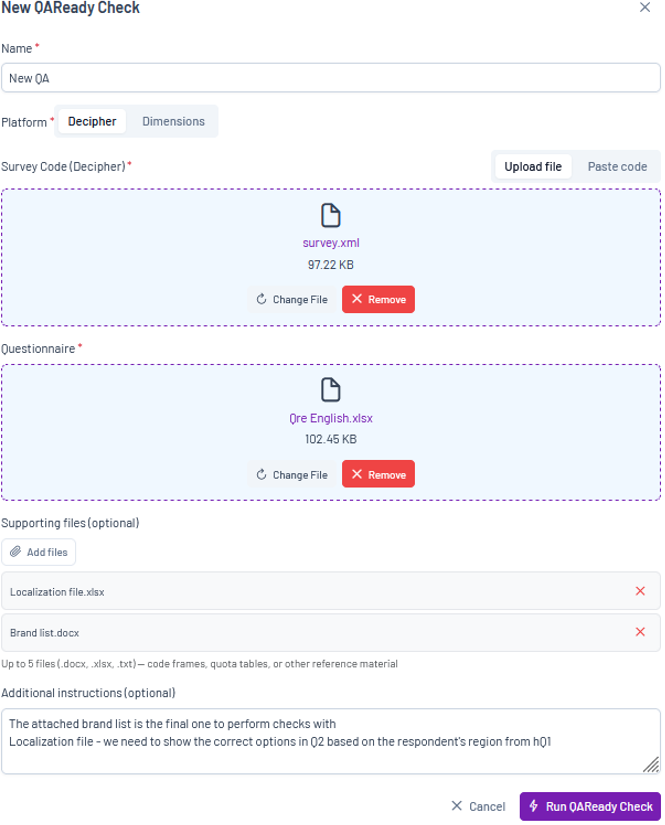
Name – Enter a name for the QAReady check.
Platform – Select the survey platform used for your project.
Survey Code – there are two ways to provide survey code:
- Upload file: Upload an exported code file. Depending on the platform, this may be an .xml or .mdd
- Paste code: Paste the survey code directly into the provided field.
Questionnaire – Upload the survey questionnaire. Both Word and Excel formats are supported.
Supporting Files (optional) – Upload any additional materials that may provide useful context for the review, such as:
- Brand lists
- Zip/postal code lists
- Formula specifications
- Quota tables
- Other reference materials
Additional Instructions – Provide any additional guidance for the AI review. For example, you can:
- Explain how specific materials should be interpreted
- Highlight important project requirements
- Provide context for supporting files
- Add instructions that should be considered during the QA process
Once all required information has been provided, select Run QAReady Check to begin the evaluation. When processing is complete, the results report will be generated automatically.